1. Linux용 Windows 하위 시스템, 가상 머신 플랫폼, Hyper-V 체크

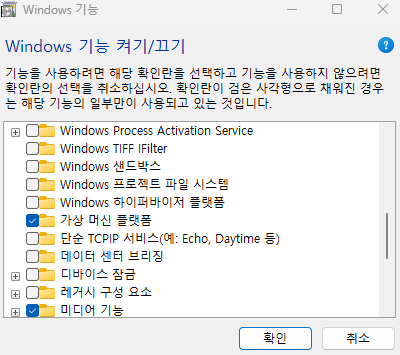
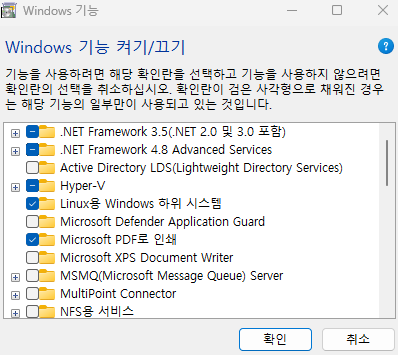
2. cmd 켜고 wsl --install

3. microsoft store 에서 우분투 최신 버전 설치
4. 컴퓨터 껐다 켜기
5. msys2 설치 https://www.msys2.org/
MSYS2
Software Distribution and Building Platform for Windows
www.msys2.org
ARM64와 x86은 CPU 아키텍처의 종류이며, 사용 중인 컴퓨터가 무엇인지에 따라 다릅니다. Windows PC에서는 설정 > 시스템 > 정보에서 **'시스템 종류'**를 확인하여 'x64 기반 프로세서' 또는 **'ARM 기반 프로세서'**를 확인하여 알 수 있으며, Mac은 M1, M2 칩 등이 사용되면서 ARM 기반으로 바뀌었지만, 인텔 기반의 구형 Mac은 x86 아키텍처입니다.
6. 명령어 입력 https://m.blog.naver.com/kimmingul/222330519820
pacman -Syu
pacman -S --needed base-devel mingw-w64-x86_64-toolchain
pacman -S mingw-w64-x86_64-clang
pacman -S gcc
nano hello.c
ls
gcc hello.c -o hello.exe
file hello.exe
./hello.exe
file hello.c
hello.c 에는 다음과 같이 코딩한 후 ctrl+O, ctrl+X 해준다.
#include <stdio.h> int main() { printf("Hello world!\n"); return 0; }
- 단계 1: 컴파일 (hello.c → hello.o)
- 단계 2: 링크 (hello.o + 라이브러리 → hello.exe)
'c' 카테고리의 다른 글
| 반복문 (while, for) (0) | 2025.11.03 |
|---|---|
| c 언어 (0) | 2025.11.02 |
| C 언어 - 연산자, 조건문(1) (0) | 2025.10.30 |
| c 언어 - 변수와 상수 (0) | 2025.10.29 |
| visual studio 설치 및 기본적인 c 테스트 (0) | 2025.10.28 |