서보모터 각도 조절해보기
#include <TimerOne.h>

const int SERVO = 10;
const int SERVO_PERIOD = 20000; // 20ms (50Hz)

// 10비트(1024) 기준으로 0.7ms~2.3ms 계산 (실수 연산 사용)
const int SERVO_MINDUTY = (1024.0 / 20.0) * 0.7;
const int SERVO_MAXDUTY = (1024.0 / 20.0) * 2.3;

void setup() {
  Timer1.initialize(SERVO_PERIOD); // 초기화 시 주기를 설정하는 것이 좋습니다.
  Timer1.pwm(SERVO, SERVO_MINDUTY);

  delay(1000);
}

void loop() {
  // loop 안에 넣어야 계속해서 반복 동작합니다.
  Timer1.setPwmDuty(SERVO, SERVO_MINDUTY);
  delay(1000);

  Timer1.setPwmDuty(SERVO, SERVO_MAXDUTY);
  delay(1000);
}
서보모터 0~180도 조절해보기
#include <TimerOne.h>

const int SERVO = 10;
const int SERVO_PERIOD = 20000; // 20ms (50Hz)

// 10비트(1024) 기준으로 0.7ms~2.3ms 계산 (실수 연산 사용)
const int SERVO_MINDUTY = (1024.0 / 20.0) * 0.7;
const int SERVO_MAXDUTY = (1024.0 / 20.0) * 2.3;

void setup() {
  Timer1.initialize(SERVO_PERIOD); // 초기화 시 주기를 설정하는 것이 좋습니다.
  Timer1.pwm(SERVO, SERVO_MINDUTY);

  delay(1000);

  for (int angle=SERVO_MINDUTY; angle<=SERVO_MAXDUTY; angle++) {
    Timer1.setPwmDuty(SERVO, angle);
    delay(30);
  }

  Timer1.disablePwm(SERVO);
}

void loop() {
}
attachInterrupt(digitalPinToInterrupt(pin), ISR, mode): 버튼을 누르는 순간 또는 떼는 순간을 감지할 수 있다
할당된 핀이 0에서 1로, 또는 1에서 0으로 바뀌는 순간을 감지하고 원하는 동작을 수행하고자 할 때 사용
pin: 핀번호, 아두이노 우노의 경우 2, 3
ISR: 인터럽트가 발생하면 하드웨어적으로 호출되는 인터럽트 처리 함수
mode: 인터럽트 발생 조건, LOW, CHANGE, RISING, FALLING 중 하나
const int ledPin = 13;
const int buttonPin = 2;

int led_state = LOW;
bool led_state_changed = false;

void buttonPressed() {
  led_state = (led_state == LOW) ? HIGH : LOW;
  led_state_changed = true;
}

void setup() {
  pinMode(ledPin, OUTPUT);
  pinMode(buttonPin, INPUT);
  attachInterrupt(digitalPinToInterrupt(buttonPin), buttonPressed, RISING);
}

void loop() {
  if (led_state_changed) {
    led_state_changed = false;
    digitalWrite(ledPin, led_state);
  }
}
#include <Servo.h>
 const int SERVO = 10;
 Servo servo;
 const int buttonPin = 2;

 int servo_state = 30;
 bool servo_state_changed = false;

 void buttonPressed() {
  servo_state = (servo_state == 30) ? 150 : 30;
  servo_state_changed = true;
 }

 void setup() {
  pinMode(buttonPin, INPUT);
  attachInterrupt(digitalPinToInterrupt(buttonPin), buttonPressed, RISING);
  servo.attach(SERVO);
  servo.write(0);
  delay(1000);
 }

 void loop() {
  if(servo_state_changed) {
    servo_state_changed = false;
    servo.write(servo_state);
  }
 }
attachPCINT(digitalPinToPCINT(pin), ISR, mode): 특정한 핀에 특정한 조건에 맞는 핀 신호 변화 인터럽트가 발생할 경우 수행할 함수를 등록하는 함수
digitalPinToPCINT(pin): 핀번호, 아두이노 우노의 경우 2, 3을 제외한 나머지 핀
ISR: 인터럽트가 발생하면 하드웨어적으로 호출되는 인터럽트 처리 함수
mode: 인터럽트 발생 조건, CHANGE, RISING, FALLING 중 하나

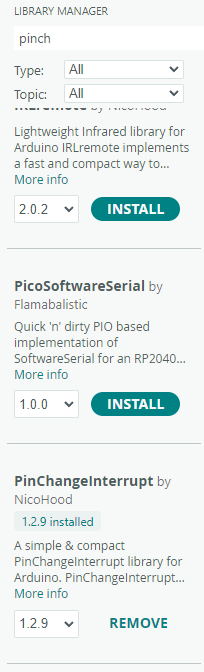
버튼 인터럽트로 LED 켜기
#include "PinChangeInterrupt.h"

const int ledPin = 13;
const int buttonPin = 4;

int led_state = LOW;
bool led_state_changed = false;

void buttonPressed() {
  led_state = (led_state == LOW) ? HIGH : LOW;
  led_state_changed = true;
}

void setup() {
  pinMode(ledPin, OUTPUT);
  pinMode(buttonPin, INPUT);
  attachPCINT(digitalPinToPCINT(buttonPin), buttonPressed, RISING);
}

void loop() {
  if(led_state_changed) {
    led_state_changed = false;
    digitalWrite(ledPin, led_state);
  }
}
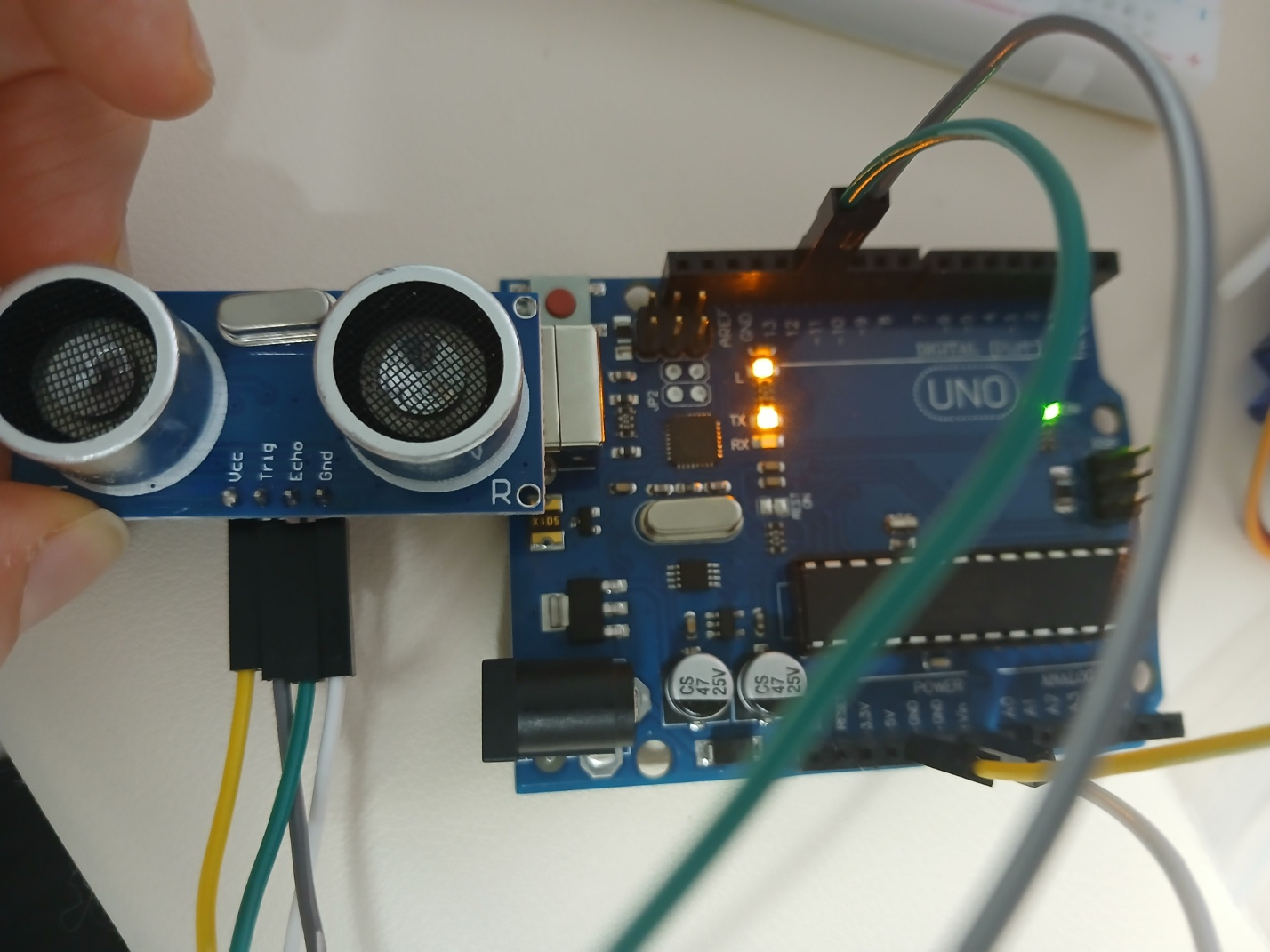
초음파 센서로 거리 측정해보기
const int trig_pin = 11;
const int echo_pin = 12;

void setup() {
  pinMode(trig_pin, OUTPUT);
  pinMode(echo_pin, INPUT);

  Serial.begin(115200);
}

void loop() {
  digitalWrite(trig_pin, LOW);
  delayMicroseconds(2);
  digitalWrite(trig_pin, HIGH);
  delayMicroseconds(10);
  digitalWrite(trig_pin, LOW);

  long duration = pulseIn(echo_pin, HIGH);
  long distance = (duration/2) / 29.1;

  Serial.print(distance);
  Serial.println("cm");
}
pulseIn 함수 수행 시간 살펴보기
const int trig_pin = 11;
const int echo_pin = 12;

void setup() {
  pinMode(trig_pin, OUTPUT);
  pinMode(echo_pin, INPUT);

  Serial.begin(115200);
}

void loop() {
  digitalWrite(trig_pin, LOW);
  delayMicroseconds(2);
  digitalWrite(trig_pin, HIGH);
  delayMicroseconds(10);
  digitalWrite(trig_pin, LOW);

  unsigned long t_begin = millis();

  long duration = pulseIn(echo_pin, HIGH);
  unsigned long t_end = millis();
  Serial.print(t_end - t_begin);
  Serial.println("ms");
}
핀 신호변화 인터럽트 사용하기
#include <PinChangeInterrupt.h>

const int trig_pin = 11;
const int echo_pin = 12;

unsigned long echo_duration = 0;
void echoIsr(void) {
  static unsigned long echo_begin = 0;
  static unsigned long echo_end = 0;
  unsigned int echo_pin_state = digitalRead(echo_pin);
  if(echo_pin_state == HIGH) {
    echo_begin = micros();
  } else {
    echo_end = micros();
    echo_duration = echo_end - echo_begin;
  }
}

void setup() {
  pinMode(trig_pin, OUTPUT);
  pinMode(echo_pin, INPUT);

  attachPCINT(digitalPinToPCINT(echo_pin), echoIsr, CHANGE);

  Serial.begin(115200);
}

void loop() {
  if (echo_duration == 0) {
    digitalWrite(trig_pin, LOW);
    delayMicroseconds(2);
    digitalWrite(trig_pin, HIGH);
    delayMicroseconds(10);
    digitalWrite(trig_pin, LOW);
  } else {
    unsigned long distance = echo_duration / 58;
    Serial.print(distance);
    Serial.println("cm");

    echo_duration = 0;
  }
}
'아두이노' 카테고리의 다른 글
| 아두이노 millis (0) | 2026.03.29 |
|---|---|
| 아두이노 - 7세그먼트 (0) | 2026.03.26 |
| 아두이노 - Timer (빛, 부저) (0) | 2026.03.23 |
| 아두이노 - 조이스틱, 부저, 서보, 초음파 (0) | 2026.03.22 |
| 아두이노 - 시리얼, LED (0) | 2026.03.22 |